> ## Documentation Index
> Fetch the complete documentation index at: https://docs.edges.run/llms.txt
> Use this file to discover all available pages before exploring further.
# Core Concepts
> Understand Identities, Integrations, and how Edges connects to LinkedIn.
**TL;DR:** Edges uses **Identities** (your users) connected to **Integrations** (LinkedIn accounts) to run **Actions**. That's it.
## How Edges Works
```
Your App → Identity → Integration (LinkedIn) → Action → Results
```
| Entity | What it is | Example |
| -------------------- | ---------------------------- | ------------------------------- |
| **Workspace Member** | Someone who logs into Edges | Your team, admins |
| **Identity** | An end user in *your* app | Your customer's account |
| **Integration** | A connected platform account | A LinkedIn profile |
| **Action** | An operation you execute | "Search People", "Send Message" |
***
## Identities vs. Workspace Members
Edges distinguishes between two types of users:
| | Workspace Member | Identity |
| -------------- | ----------------------------------------------------------------- | ------------------------------------------- |
| **Who** | Your team | Your end users |
| **Access** | Edges dashboard | None (API only) |
| **Purpose** | Manage settings, billing | Execute automated actions |
| **Example** | Admin, developer, ops | LinkedIn account for outreach |
| **How to add** | [Invite via Members page](https://app.edges.run/settings/members) | [Create via API](/v1/api/identities/create) |
### Workspace Member Roles
| Role | Permissions |
| --------- | ------------------------------------------------------- |
| **Admin** | Full access: Members, Identities, Integrations, Billing |
| **Ops** | Manage Identities & Integrations (no billing) |
| **User** | Read-only access |
### What is an Identity?
An **Identity** represents an end user in your SaaS or AI agent platform. Identities:
* Execute automated Actions on your behalf
* Connect to Integrations (like LinkedIn)
* Have no access to the Edges dashboard
* Are ideal for mapping your users to integration accounts
**When do you need Identities?** Only for actions that require being "logged in" — sending messages, accepting invitations, etc. For generic enrichment, use [Managed Mode](/v1/identities/modes#managed-mode) instead.
### Identity Modes
Control how accounts execute your Actions:
| Mode | Setup | Cost | Best for |
| --------- | ---------------- | ------------ | ------------------------ |
| `managed` | None | 1.5× credits | Getting started, testing |
| `direct` | Connect accounts | Standard | User-specific outreach |
| `auto` | Rent accounts | \$70-125/mo | High-volume operations |
See the [Quickstart](/v1/quickstart#identity-modes-explained) for code examples of each mode.
### Managing Identities
Use the [Create Identity API](/v1/api/identities/create) or the [Identities page](https://app.edges.run/identities).
Link a LinkedIn account via [Chrome Extension](/v1/linkedin/chrome-extension), [API authentication](/v1/api/linkedin/authentication), or [cookies](/v1/api/integrations/connect).
Use `identity_ids` in your API calls to specify which Identity runs the Action.
**Licensing:** Identity seats are included in your plan. Check [Pricing](https://edges.run/pricing) for your allocation. Contact [sales@edges.run](mailto:sales@edges.run) for higher limits.
### Identity Security
Every Identity is assigned a unique IP address for enhanced security. Learn more about [Identity management and security](/v1/identities/add-manage-identities).
***
## Integrations
An **Integration** connects an Identity to an external service (LinkedIn, Sales Navigator, etc.).
* Each Integration belongs to **one Identity**
* Integrations authenticate your requests with third-party APIs
* Multiple Integrations can connect to the same Identity (e.g., LinkedIn + Sales Navigator)
### LinkedIn Integrations
| Feature | Description |
| ---------------------- | ------------------------------------------------------ |
| **Smart Limits** | Edges auto-enforces safe usage to prevent restrictions |
| **Supported Licenses** | Sales Navigator, Premium, Recruiter Lite |
| **Account Rental** | Skip the hassle of warming up accounts |
How Edges protects your accounts
What's supported
Choose your approach
Avoid rate limits
### LinkedIn Webhooks
Get real-time notifications when account status changes:
| Event | When it fires |
| -------------- | ------------------------------ |
| `AUTH_SUCCESS` | Account connected successfully |
| `AUTH_PENDING` | Awaiting verification |
| `AUTH_FAILED` | Connection failed |
| `AUTH_EXPIRED` | Session expired |
| `AUTH_UPDATED` | Credentials refreshed |
Webhooks are essential for maintaining reliable integrations. See [setup instructions](/v1/identities/linkedin#monitor-linkedin-integration-status-with-webhooks).
***
## Execution Modes
Edges supports three ways to run Actions:
* **Response:** Immediate (synchronous)
* **Use case:** Single requests, real-time enrichment
* **Endpoint:** `/run/live`
```bash theme={null}
POST /v1/actions/linkedin-extract-people/run/live
```
Best for most use cases due to simplicity.
* **Response:** Run ID immediately, results via callback
* **Use case:** Batch processing, large datasets
* **Endpoint:** `/run/async`
```bash theme={null}
POST /v1/actions/linkedin-extract-people/run/async
```
Ideal when processing thousands of records or when real-time isn't required.
See [Async & Callbacks](/v1/runs/callbacks) for implementation details.
* **Response:** Schedule ID, results via callback on each run
* **Use case:** Recurring tasks, campaigns, off-peak processing
* **Endpoint:** `/run/schedule`
```bash theme={null}
POST /v1/actions/linkedin-extract-people/run/schedule
```
Define `schedule_at`, `cron`, and `timezone` for precise timing.
See [Schedules](/v1/runs/schedules) for CRON examples.
***
## Data Model
For developers building deep integrations, here's the database schema showing entity relationships:
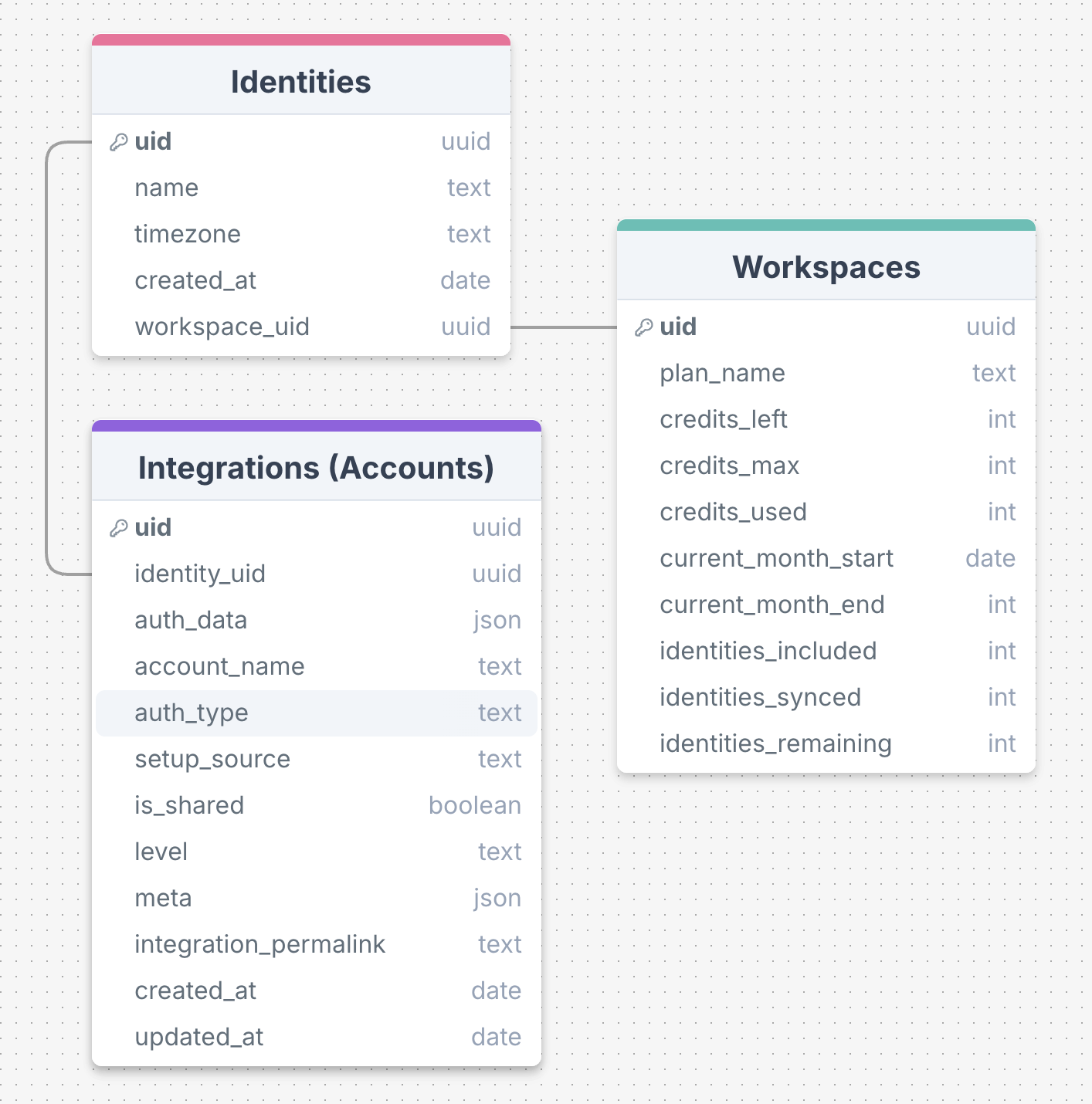 **Interactive version:** [View full diagram](https://drawsql.app/teams/edges/diagrams/embed-edges-data-v1)
***
## What's next?
Create and manage your first Identity
Link a LinkedIn account to an Identity
Explore 60+ available Actions
Type-safe SDK for faster development
**Interactive version:** [View full diagram](https://drawsql.app/teams/edges/diagrams/embed-edges-data-v1)
***
## What's next?
Create and manage your first Identity
Link a LinkedIn account to an Identity
Explore 60+ available Actions
Type-safe SDK for faster development